apk.cafe
Best apps for your Android

Hi, There you can download APK file "Quick Bengali Keyboard" for Android free, apk file version is 5.3 to download to your android device just click this button. It's easy and warranty. We provide only original apk files. If any of materials on this site violates your rights, report us

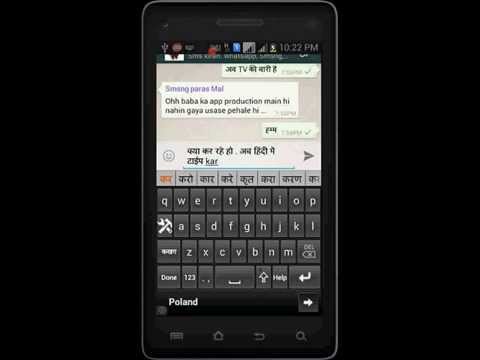
Screenshots of Quick Bengali Keyboard Emoji &

  • Quick Bengali Keyboard Emoji &
  • Quick Bengali Keyboard Emoji &
  • Quick Bengali Keyboard Emoji &
  • Quick Bengali Keyboard Emoji &
  • Quick Bengali Keyboard Emoji &
  • Quick Bengali Keyboard Emoji &
  • Quick Bengali Keyboard Emoji &
  • Quick Bengali Keyboard Emoji &
  • Quick Bengali Keyboard Emoji &
  • Quick Bengali Keyboard Emoji &
  • Quick Bengali Keyboard Emoji &
  • Quick Bengali Keyboard Emoji &
  • Quick Bengali Keyboard Emoji &
  • Quick Bengali Keyboard Emoji &
  • Quick Bengali Keyboard Emoji &
  • Quick Bengali Keyboard Emoji &
  • Quick Bengali Keyboard Emoji &
  • Quick Bengali Keyboard Emoji &
  • Quick Bengali Keyboard Emoji &
  • Quick Bengali Keyboard Emoji &
  • Quick Bengali Keyboard Emoji &

Description of Quick Bengali Keyboard Emoji & (from google play)

No.1 Bangali Keyboard.
Quick Bengali Keyboard provides the option to type Emoji icons in your message like on Whatsapp,facebook messenger or texting sms.
This is a Soft Keyboard to type Bengali on your Phone. You can type easily on any app like Gmail, Facebook, Whatsapp. You can write blogs in Bengali in your web browser.
This keyboard works as default keyboard in android phones/tablets for typing/texting in Bengali. Just type in English and press spacebar your English word will be converted into Bengali script automatically.
This keyboard provides word suggestions to type in more faster manner. This Keyboard also provides option to type text in English.If you want to type in English just press toggle button to switch English to Bengali or Bengali to English.
If your are able to read "হ্যালো" (Bengali text) on your mobile phone, you can install this application.Quick Keyboard provides easy way to type in Indian languages.Bengali Keyboard helps to enjoy each and every taps with music just on your fingers.
App will help to type your all words in Bengali. Our app is having more than 300 Emoji and it is fully free to use in any text message format.And yes it is supporting more than 10 languages. Quick "Bengali keyboard" app will allows you to type message, Story, E-mails,blogs etc. in Bengali language. You will also find superb eye catching themes on Quick Bengali Keyboard. You can also customize these themes in keyboard and make it more attractive as per your wish by making required modification in custom settings.

For more better understanding Please see video to know how it works.

Features:

Enable Keyboard.
Stunning Themes are there to decorate your keyboard.
You can set your photo as background in keyboard.
See preview of keyboard inside app.
8+ different settings available.
Find Emoji in Quick "Bengali Keyboard" app and add in your text.

Installation.

1. Download and install this application on phone.
2. Open EazyType Home screen. there are two button on screen (i) Enable Keyboard (ii) Choose default
3. Press 'Enable Keyboard" button and select EazyType Keyboard to enable the keyboard
4. Press "Choose default" button and choose EazyType Keyboard as default keyboard.

OR

2. Go to "Setting"->"Language and Input" and tick in check box on EazyType Bengali
3. Go to any text filed in which you want to type.
4. Drag Notification bar (On the top of phone display Screen). Tap on "Select input method"
Now Select "EazyType Bengali" (On a popup)

OR

Long press on text field and choose "Input Method".
Now Select EazyType Bengali (On a popup)

What's new in Quick Bengali Keyboard Emoji &

New in Quick Bengali Keyboard 5.1
Whatsapp Sticker Supported. New Themes, Gifs & sticker supported. Improved quality of Suggestions for fast typing.
To remove Ad, A complain form option is given.
user can save their custom words in dictionary.
Please rate this app

Quick Bengali Keyboard Emoji & Version History: APK Size & Android Support

Explore the version history of Quick Bengali Keyboard Emoji & for Android and see how the app has evolved over time. This section tracks versions added to the apk.cafe catalog, including download size, declared permissions, and Android compatibility. Select a time period or a point on a chart to explore historical version data.

Quick Bengali Keyboard Emoji & Catalog Statistics

Quick Bengali Keyboard Emoji & Versions Added by Quarter

Q3 20241 version added
New versions in the catalogNo updates since Sep 2024

2 new Quick Bengali Keyboard Emoji & versions were added to the apk.cafe catalog in 2024. The catalog contains 11 versions dating back to June 2017.

Quick Bengali Keyboard Emoji & Download Size History

5.3Sep 6, 202458.87 MB APK
Download size for most phonesNo updates since Sep 2024

The Quick Bengali Keyboard Emoji & download size for most phones increased from 18.87 MB in version 3.1.1 (2017) to 58.87 MB in version 5.3, a 212% increase.

Quick Bengali Keyboard Emoji & Permissions History

5.3Sep 6, 202419 permissions
Permissions declared by the versionNo updates since Sep 2024

Quick Bengali Keyboard Emoji & 5.3 declares 19 permissions, 12 more than version 3.1.1 from 2017 (7).

Quick Bengali Keyboard Emoji & Android Compatibility History

5.3Sep 6, 2024Android 5.0+, built for 14
Requires (minimum Android)Built for (target Android)No updates since Sep 2024

Quick Bengali Keyboard Emoji & 5.3 requires Android 5.0 or newer and is built for Android 14; version 3.1.1 from 2017 ran on Android 3.0 or newer.

Older versions of Quick Bengali Keyboard Emoji &. The apk.cafe catalog has 11 versions of Quick Bengali Keyboard Emoji &, from 3.1.1 (Jun 2017) to Quick Bengali Keyboard Emoji & 5.3 (Sep 6, 2024). If the latest version has a bug, changed something you rely on or does not work on your phone, you can install an earlier one from the list of older Quick Bengali Keyboard Emoji & APK versions below.

Version 5.3 needs Android 5.0 or newer. On older phones: Android 4.4 runs up to version 5.1 (Jan 2023), Android 4.1 runs up to version 3.2.3 (Jan 2020).

Android does not install an older version over a newer one, so uninstall Quick Bengali Keyboard Emoji & first. This usually deletes the app's data on the phone, so back up anything you need.

Dates show when each version was added to the apk.cafe catalog. Size is the full download for most phones; permissions are for the same build.

Quick Bengali Keyboard Emoji & 5.3 permissions

Check before installing: Shows over other apps +119

Worth knowing

  • Shows over other appsCan draw on top of other apps. You can turn it off in Settings, Apps, Special app access.
  • Own keyboardA keyboard sees everything you type in it, including passwords. Use it only if you trust the app.
  • Uses your advertising IDFor personalised ads and ad measurement. You can reset or delete it in Settings, Privacy, Ads.
  • In-app purchasesMay offer paid content through Google Play.
Asks firstShow the list (3)
  • Microphonerecord audio
  • Filesread the contents of your shared storage, modify or delete the contents of your shared storage
Special accessShow the list (1)
  • Display over other appsCan appear on top of other apps or other parts of the screen. This may interfere with normal app usage.
Granted automaticallyShow the list (15)
  • control vibration
  • get ad topics based on your app use (Android ad services)
  • have full network access
  • in-app purchases through Google Play
  • learn how the app was installed (install referrer)
  • measure ad clicks and installs (Android ad services)
  • prevent phone from sleeping
  • read sync settings
  • read sync statistics
  • run at startup
  • run foreground service Android 9+
  • toggle sync on and off
  • use the advertising ID
  • use the advertising ID (Android ad services)
  • view network connections

Hardware

No special hardware required.

Permission changes

No changes since 5.1.

More info

Advertisement

Quick Bengali Keyboard Emoji & Older APK Versions for Android

Similar apps

Popular android apps